
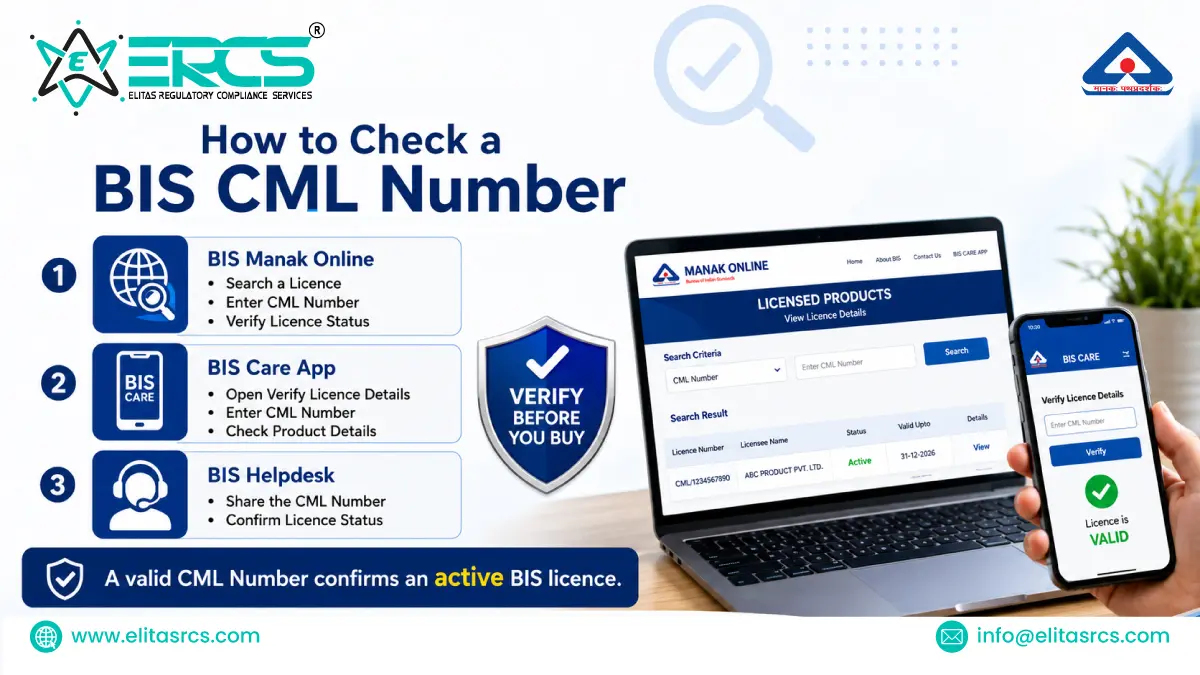
To check a CML number online, open the BIS Care App or the BIS Manak Online portal, choose the licence verification option and enter the CM/L number printed below the ISI mark on the product. You will see the manufacturer's name, factory address, product, IS number, brand and the current licence status within seconds. The service is free, and both the older 7-digit format and the 10-digit format are accepted.
The CM/L number is the quickest way to confirm that an ISI-marked product comes from a genuine BIS licensee. This guide explains what the number means, where to find it, how to verify it, and what to do when a search returns nothing.
What Is a CML Number in BIS?
A CML number is the licence number BIS grants to a manufacturer who has been approved to use the ISI mark (BIS Standard Mark) under ISI Certification (Scheme-I). It is written as CM/L-XXXXXXXXXX and appears below the ISI mark on the product or its packaging. The number tells you three things: the manufacturer holds a BIS licence, the product is covered under the scope of that licence, and the licence can be checked on official BIS platforms. It is not a product serial number and not a batch number.
What Is the Full Form of CML?
CML stands for Certification Marks Licence. In BIS documents it is written as CM/L, and "CML number" and "CM/L number" mean the same thing. It is the licence under which a manufacturer is permitted to put the ISI mark on products that meet the relevant Indian Standard (IS).
Where Is the CM/L Number on a Product?
Look for the ISI mark first. BIS specifies that the licence number should be shown suitably on the product with the Standard Mark, preferably below it, as CM/L-XXXXXXXXXX. On a genuine product you will usually find three items together:
- The ISI mark (BIS Standard Mark)
- The IS number of the standard the product is made to
- The CM/L number, often with the brand name
On small products the marking may be embossed or printed on the body. On packaged goods it is usually on the label or carton. If you see an ISI mark with no CM/L number at all, treat the product as suspect and verify the manufacturer before buying.
How to Check CML Number Online
Both official methods below are free.
Check Through BIS Manak Online
- Open the official BIS Manak Online portal (manakonline.in).
- Go to the licence search or Status of Licence section.
- Enter the CM/L number. You can also search by licensee name.
- Complete the CAPTCHA and click Search or Generate Report.
- Compare the manufacturer, product, IS number and status on screen with what is printed on your product.
Check Through the BIS Care App
- Download the BIS Care App from Google Play or the App Store.
- Open the app and select Verify Licence Details.
- Type in the CM/L number printed on the product or packaging.
- Tap Verify.
- Review the manufacturer, brand, licence validity and current status shown.
Contact the BIS Helpdesk
If the online result is unclear, contact the BIS helpdesk or the nearest BIS branch office with the CM/L number and product details and ask them to confirm the licence status.
How to Identify a 10-Digit CML Number
BIS is moving all product certification licences to a fixed 10-digit series. Older licences with fewer digits are shown with leading zeros so that every number has 10 digits. The upgrade is only a change of format. It does not change the validity, scope or status of the licence.
|
Old licence number |
10-digit CM/L number |
|---|---|
|
1234567 |
0001234567 |
|
987654 |
0000987654 |
To check the length, count the digits after CM/L-. In line with the BIS clarification dated 6 September 2024, both the original format and the 10-digit format are accepted for verification during the transition period. If one version returns no result, try the other, and keep the leading zeros when you type the 10-digit version.
How to Find the Manufacturer Name Using a CML Number
To find out which company made a product, enter the CM/L number in Manak Online or the BIS Care App. A valid result shows:
- Manufacturer (licensee) name
- Factory address
- Product name
- Brand name, where applicable
- IS number
- Licence validity period and current status
- Scope of the licence
Check that the brand and product on your pack match the result. A real CM/L number copied onto a different brand or product is a common sign of misuse.
How to Check CML Number for Plywood and Other Products
The steps are the same for every product. What changes is the IS number you should expect to see in the result.
|
Product |
Expected IS standard |
What to confirm |
|---|---|---|
|
Plywood (general purpose) |
IS 303 |
Manufacturer, plywood type and licence status |
|
Protective helmets |
IS 4151 |
Brand, licence status, helmet type |
|
Pressure cookers |
IS 2347 |
Manufacturer, brand, licence validity |
|
Electrical appliances |
IS 302 (Part 1) |
Product category listed in the licence scope |
For plywood, find the CM/L number on the stamped mark on the sheet or on the packaging, verify it online, and confirm that the licence covers plywood and the grade you are buying. A licence that lists a different product is a red flag. The IS number printed on the product should match the one in the BIS result.
Difference Between CML Number, ISI Mark and BIS R Number
The ISI mark is the symbol. The CM/L number is the licence number that must accompany it. A BIS R number is a different identifier issued under the Compulsory Registration Scheme.
|
Feature |
BIS R Number |
BIS CM/L Number |
|---|---|---|
|
Full form |
BIS Registration Number |
Certification Marks Licence Number |
|
Scheme |
Compulsory Registration Scheme (Scheme-II) |
ISI Mark certification (Scheme-I) |
|
Printed format |
R-XXXXXXXX |
CM/L-XXXXXXXXXX |
|
Typical products |
Mobile phones, laptops, LED lights, power banks, adapters |
Electrical appliances, steel, cement, cables, furniture, pressure cookers, helmets, plywood |
|
Where to verify |
BIS CRS portal or BIS Care App |
Manak Online or BIS Care App |
To understand how the schemes differ, read our guide on BIS certification schemes.
How to Identify a Fake or Invalid CML Number
A printed ISI mark alone is not proof. Treat the licence as doubtful if any of these apply:
- The CM/L number returns no record on Manak Online or the BIS Care App
- The manufacturer name in the result does not match the brand on the pack
- The product is not listed in the licence scope
- The licence is expired, suspended, cancelled or inactive
- The mark or number is blurred, misspelt, tampered with or printed in odd formats
- The IS number is missing or belongs to a different product
- The same CM/L number appears on several unrelated brands or products
What to Do If the CML Number Is Not Found Online
- Re-enter the number carefully, without spaces, and keep any leading zeros.
- Try both the 7-digit and the 10-digit versions.
- Make sure you are searching a CM/L number and not an R number or a serial number.
- Try again later, as portals can be slow or temporarily down.
- If it still fails, contact the BIS helpdesk with a photo of the marking, and avoid buying the product until it is confirmed.
Can You Get a CML Number List or Download a BIS Certificate?
BIS does not need you to rely on a loose PDF. Search the licence directly by CM/L number or licensee name on Manak Online, which always shows the current status. Third-party lists can be outdated, so use them only as a starting point.
The licence certificate itself is held by the manufacturer. If you need a copy for procurement or tendering, ask the licensee for it and cross-check the details with the online verification result. For a longer walkthrough, see how to check a BIS certificate online.
Common Mistakes to Avoid While Checking a CML Number
- Mistyping the number or dropping leading zeros
- Confusing the CM/L number with an R number or serial number
- Trusting the printed ISI mark without verifying it online
- Ignoring the licence validity and status
- Not matching the product, brand and IS number with the BIS result
Need an ISI Licence for Your Own Product?
If you are a manufacturer and want your own CM/L number, our team handles the full ISI certification process, from testing and documentation to factory inspection. Foreign manufacturers can apply through the BIS FMCS route with an Authorised Indian Representative (AIR). You can also read how to apply for BIS certification.
Call +91-9076611770 / +91-9076611766 or email INFO@ELITASRCS.COM for a free consultation.
Conclusion
Checking the CM/L number takes less than a minute and is the most reliable way to confirm an ISI-marked product. Verify the number on Manak Online or the BIS Care App, match the manufacturer, product and IS number with what is on the pack, and confirm that the licence is active before you buy or use the product.